
Label recalls rarely start with a dramatic failure. They start with one wrong digit in a lot code. Or a barcode scans on the line and fails at a retailer, or yesterday’s artwork stays in the applicator after a changeover. A label looks simple. On a packaging line it carries four separate checks, and each one fails in its own way.
Does the Barcode Scan, and How Well?
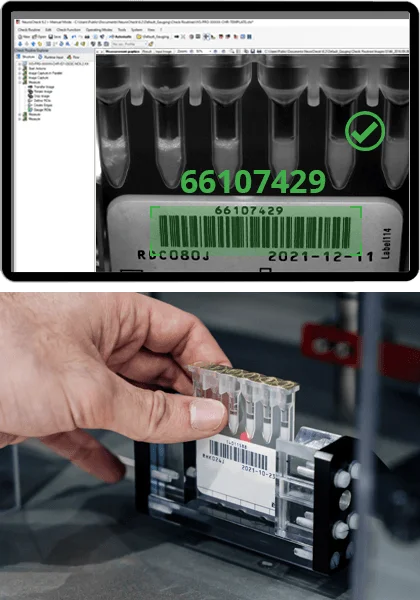
A barcode check has two levels. The first asks whether the code decodes at all and whether the data matches the product on the line. The second asks how good the print is, since a code that decodes on a clean fixed scanner can still fail at a store checkout or a distribution center.
Barcode quality has a published yardstick. ISO/IEC 15416 grades linear barcodes and ISO/IEC 15415 grades 2D codes such as Data Matrix and QR. Both use a scale from 4.0 down to 0.0, often shown as letter grades A to F. Contrast, edge sharpness, quiet zones and decode errors all count toward it. GS1, the body that issues retail barcode numbers, publishes the minimum grade each application needs in its General Specifications. Good label inspection systems report the grade for every pack, so a slow fall from B to C shows up before codes start failing in the field.
Are the Date and Lot Codes Right?
Labels go wrong most often in the variable data. Inkjet and thermal printers add expiry dates, lot numbers and line codes at speed, and they smudge, drop characters or print the wrong value. Two checks apply here. Optical character recognition, or OCR, reads the printed text. Optical character verification, or OCV, compares that text with what the line expects for this shift and this batch.
Both checks matter on every pack. A perfectly legible code with the wrong date is still a recall, and a correct code with a missing digit fails a customer audit. The classic failure is a changeover at midnight where the printer keeps the old date for the first few hundred packs.
Character quality is hard for fixed rules on curved bottles, embossed foil and dot-matrix fonts. AI label verification copes better with that variation because it learns from real samples of each font and surface.
Is the Print Itself Clean?
The barcode grade leaves plenty unchecked. A useful check looks for:
- Smears, voids or streaks across text and graphics
- Color shifts against the approved artwork
- Misregistration, where color layers sit out of line with each other
- Missing or partial elements such as an allergen statement or a recycling mark
The last item deserves extra attention. An allergen line that prints faint or not at all can trigger a recall even when everything else on the label passes. Checking it against the approved artwork for that exact SKU catches a mix-up that a generic print check would pass.
Is the Label Where It Should Be?
Placement starts with position and angle. A camera measures how far the label sits from its target spot and how many degrees it is skewed, then compares both with limits taken from the pack specification. It also looks for wrinkles and bubbles, plus flags, where a corner lifts away from the container.
These faults cause real losses downstream. A skewed label on a round bottle can push the barcode around the curve and out of a scanner’s view. A flagged corner can catch on a conveyor guide and tear the label off downstream. Wrong-label errors belong here too, when a carton of one SKU gets the label of another, and the only defense is checking the content against the production order.
How Do You Set Up the Checks?
Start from the label specification, then list each field with its pass rule. A barcode grade, a code string, an artwork match and a placement window give four simple rules for an operator to read on screen.
Next, decide what happens to a reject. Kick it off the line and log the image. Alert the operator after three rejects in a row, because a run of failures usually means the printer or the applicator needs attention.
Finally, test with real failures. Print a few deliberately bad labels with a missing digit, a smeared code and a skewed placement, then run them through. Label inspection systems that catch all three on the first pass are ready for the line. If any slip through, review the AI label verification settings before the next production run.
Jidoka Technologies sets up vision AI checks for labels, codes and print placement on packaging lines.

