

A printer jams and someone fixes it in five minutes. A server goes down and the whole office stops working for two days. Both are IT problems, but they could not be more different in scope, urgency, or the expertise required to resolve them. That gap is exactly why structured IT support exists, and why understanding how it works can save a business a significant amount of money, stress, and lost productivity.
This article breaks down the tiered IT support model used by most managed service providers and internal IT departments. By the end, you will have a clear picture of what each tier covers, which tier your business likely needs most, and how to spot gaps in your current setup before they become expensive surprises.
What the Tiered IT Support Model Actually Means
The tiered model organizes IT support into levels based on complexity. Simple, repeatable problems get handled at lower tiers by generalists or even automated tools. Complex, business-critical issues escalate upward to specialists with deeper technical knowledge. This structure keeps resolution times short and costs manageable, because you are not paying a senior network engineer to reset passwords all day.
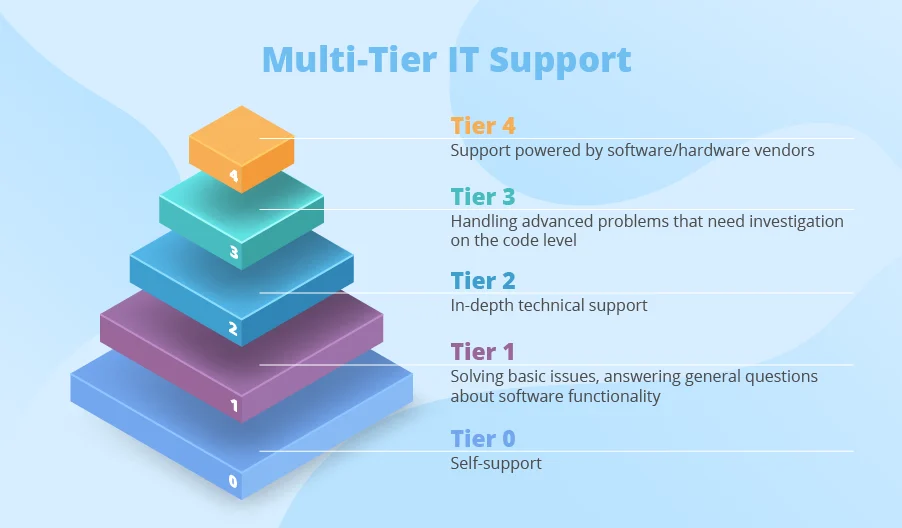
Most organizations use a four-tier framework, sometimes labeled Tier 0 through Tier 3. Some add a Tier 4 for vendor-level support. The boundaries between tiers vary slightly depending on the provider, but the underlying logic is consistent across the industry.
A Breakdown of Each Support Tier
Tier 0: Self-Service and Automation
Tier 0 does not involve a human technician at all. It is the knowledge base article an employee reads to fix their own issue, the password reset portal, the chatbot that walks someone through connecting to the VPN. Organizations often underestimate how much this tier can absorb. When self-service resources are well-maintained, a large portion of common requests never need to reach a person. That frees up the rest of the support structure to focus on genuinely difficult problems.
Tier 1: The Help Desk
Tier 1 is the first human point of contact. Help desk technicians handle routine, well-documented issues: software installation, printer setup, account lockouts, basic connectivity problems, and similar requests. They work from established scripts and runbooks. When a problem falls outside those scripts, they escalate it rather than attempt a fix they are not qualified to deliver. Resolution times at this tier are usually measured in minutes to a few hours.
Tier 2: Desktop and Systems Support
Tier 2 technicians have broader technical knowledge and more diagnostic authority. They handle issues that Tier 1 could not resolve: deeper software conflicts, hardware failures, operating system problems, and configuration errors that require hands-on investigation. They may work remotely or on-site depending on the issue. Resolution at this level can take anywhere from a few hours to a full business day, depending on complexity.
Tier 3: Infrastructure and Engineering
Tier 3 is where subject matter experts live. These are the people who manage servers, networks, cloud environments, cybersecurity infrastructure, and enterprise applications. Problems that reach Tier 3 are usually affecting multiple users or critical systems. Resolutions here may take days and often involve root cause analysis to prevent the same failure from recurring. Many small and mid-sized businesses access Tier 3 expertise through a managed service provider rather than hiring full-time engineers.
Tier 4: Vendor Support
Tier 4 is outside the organization entirely. It is the support relationship with Microsoft, Cisco, your cloud hosting provider, or any other third-party vendor whose product is at the root of the issue. Your internal team or MSP manages the vendor relationship and acts as the liaison. This tier handles bugs, licensing issues, and product defects that cannot be resolved without the original manufacturer’s involvement.
| Tier | Handled By | Typical Issues | Average Resolution Time |
| Tier 0 | Self-service tools, automation | Password resets, FAQ lookups, basic how-to | Immediate |
| Tier 1 | Help desk generalists | Account lockouts, printer setup, basic connectivity | Minutes to a few hours |
| Tier 2 | Desktop and systems technicians | Hardware failures, OS errors, software conflicts | Hours to one business day |
| Tier 3 | Engineers and specialists | Server outages, network failures, security incidents | One to several days |
| Tier 4 | Third-party vendors | Product bugs, licensing defects, platform outages | Varies by vendor SLA |
Why Tier Coverage Gaps Are So Costly
The most common mistake small businesses make is assuming that a part-time IT person or a break-fix contractor covers all their needs. In practice, a single generalist technician can handle Tier 1 and some Tier 2 issues reliably. But when a server goes down or a ransomware attack hits, they are out of their depth, and the business is left exposed. According to IBM’s 2023 Cost of a Data Breach Report, the global average cost of a data breach reached 4.45 million dollars, the highest figure recorded in the report’s 18-year history. Even scaled down for a small business, the financial damage from a single serious incident can be devastating.
The tiered model exists precisely to close those gaps. When each level is properly staffed or contracted, escalation paths are clear, response times are predictable, and no single problem falls through the cracks because nobody has the skills to handle it.
How Businesses in Specific Regions Find the Right Coverage
Geography matters more than most business owners realize when building an IT support structure. Remote support handles a large portion of modern IT work, but Tier 2 and Tier 3 issues sometimes require a technician to be physically present. Server hardware failures, on-site network installations, and workstation replacements are not things anyone can fix over a remote session. Businesses that rely entirely on a remote-only provider often discover this limitation at the worst possible moment.
For businesses operating along the Southern California coast, finding a provider who can deliver both remote and on-site coverage across all tiers is a practical concern worth researching carefully. A company looking for Orange County IT support should ask prospective providers specifically which tiers are covered under their standard agreement and what the escalation path looks like when an issue moves beyond Tier 1 or Tier 2.
Questions to Ask Before Signing an IT Support Agreement
Not all managed service agreements are created equal. Some cover only help desk functions and route everything else to hourly billing. Others include full-stack coverage from Tier 0 through Tier 3 for a flat monthly fee. Before committing to a provider, it helps to ask pointed questions that reveal exactly what you are getting.
- Which tiers are explicitly included in the monthly agreement, and which are billed separately?
- What is the documented escalation process when a Tier 1 technician cannot resolve an issue?
- Do you have engineers on staff for Tier 3 issues, or do you subcontract that work?
- What are your guaranteed response and resolution times at each tier?
- Can you provide on-site support if remote access is insufficient, and what is the response time for that?
- How do you handle after-hours and weekend incidents for critical systems?
- Who manages vendor relationships and third-party escalations on our behalf?
A provider who cannot answer these questions clearly is a provider whose structure is probably not as organized as the tiered model requires. Vague answers to tier coverage questions almost always mean hidden costs later.
Signs Your Current IT Support Structure Has a Tier Problem
Sometimes a business does not realize its support structure is incomplete until something goes seriously wrong. But there are earlier warning signs worth paying attention to.
- The same IT problems keep recurring without a documented fix or root cause analysis.
- Simple requests take days to resolve because there is no one available to handle them quickly.
- A serious incident like a server failure or a security breach caused days of downtime.
- There is no documented escalation path, so every problem goes to the same one or two people regardless of complexity.
- Employees have started working around IT problems on their own because they expect slow responses.
- Your IT contact frequently says a problem is outside their area and offers no clear path to resolution.
Any one of these symptoms suggests a tier gap. Multiple symptoms together suggest it is time to do a structured audit of your support coverage and compare it honestly against what the tiered model recommends.
Putting It All Together
The tiered IT support model is not just a vendor sales framework. It is a practical way to match the right expertise to the right problem at the right cost. Tier 0 keeps simple requests out of the queue entirely. Tier 1 handles the everyday friction that slows employees down. Tier 2 and Tier 3 tackle the problems that can genuinely threaten business continuity. And Tier 4 manages the relationships with the vendors whose platforms your entire operation depends on. Understanding where your current setup falls short of that structure is the first step toward closing the gaps before they become crises.

