

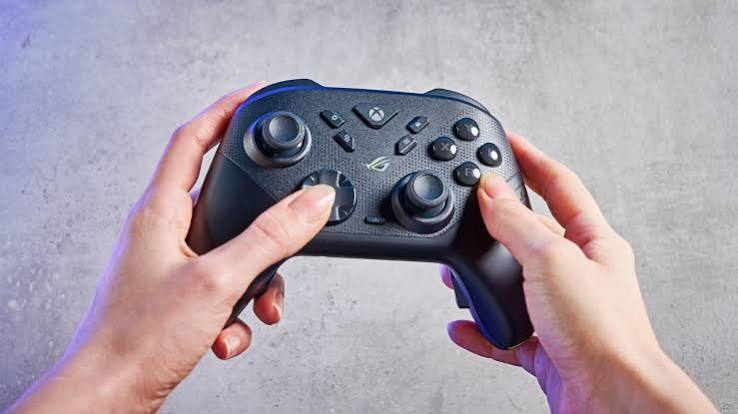
Problem: your thumbstick has started drifting, your character walks slowly to the left on its own, and you’re wondering whether to buy the same model again or finally upgrade. Choosing a slot controller used to be simple because you used whatever came in the box. Now there are wired pads, wireless pads, pro-style controllers with paddles, budget alternatives and everything in between.
The best choice depends on what you play, how long you play and how much you’re willing to spend. Let’s sort through the options without the marketing noise.
Wired vs Wireless: Latency and Convenience
Wired Controllers
Wired controllers connect directly to your console or PC. Their main advantages are reliability and no battery worries. For competitive players, a wired connection removes one possible source of input delay and dropouts.
The downside is the cable itself. It limits where you sit, can get tangled, and may be awkward if you play on a couch far from the screen.
Wireless Controllers
Modern wireless controllers have very low latency, and most players won’t notice any difference in everyday play. They offer freedom to sit anywhere and a cleaner setup.
The trade-offs are charging, occasional interference and battery wear over time. Many wireless controllers can also be used with a cable, giving you the best of both when needed.
Honestly, for most players, wireless convenience wins. Competitive players chasing every possible advantage often keep a cable handy for ranked sessions.
Pro-Style Features: Paddles and Triggers
Pro-style controllers add features aimed at competitive play. Common extras include:
- Back paddles: extra buttons on the rear, letting you jump, crouch or reload without lifting your thumbs from the sticks.
- Trigger stops: shorten trigger travel so shots fire faster in shooters.
- Swappable sticks: different heights or shapes for precision or comfort.
- Custom profiles: save button layouts for different games.
Paddles are the feature most players find genuinely useful. Being able to move and aim while performing other actions is a real advantage in fast games.
That said, pro controllers can cost several times more than standard pads. If you mainly play story games or casual titles, the extras may never justify the price.
Stick Drift and Durability
Stick drift happens when a thumbstick registers movement even though you aren’t touching it. It’s one of the most common controller complaints and can make games almost unplayable.
A few ways to reduce the risk or deal with it:
- Look up durability reviews before buying, especially for expensive models.
- Keep controllers clean and away from food crumbs and dust.
- Adjust dead zones in game settings to hide mild drift.
- Check warranty terms, since drift is often covered within the warranty period.
- Consider controllers with replaceable stick modules or newer stick technology designed to resist wear, where available.
I’ve had two controllers develop drift within a year of heavy use. Since then, warranty length has become one of the first things I check.
Comfort and Grip
Comfort matters more than any feature list. A controller you play with for hours should feel natural in your hands.
- Size and weight: larger hands often prefer bulkier controllers, while smaller hands may find them tiring.
- Stick layout: some players prefer symmetrical sticks, others offset sticks. Try both if you can.
- Grip texture: textured grips help during long, sweaty sessions.
- Button feel: some players like clicky buttons, others prefer soft and quiet.
If possible, hold a controller in a shop or borrow a friend’s before buying. Ten minutes with it tells you more than a spec sheet ever will.
Matching a Pad to Your Games
Here’s a quick guide to choosing a slot controller:
- Casual and story games: a standard wireless controller is perfect.
- Competitive shooters: consider paddles and trigger stops, plus a wired option.
- Fighting games: look for a good directional pad, or consider a dedicated arcade-style controller.
- Racing games: responsive analogue triggers matter a lot.
- PC players: check compatibility, since some controllers need extra software or setup.
Budget third-party controllers can be great value, but quality varies widely. Check reviews for build quality, latency and stick accuracy before buying.
FAQ
Are wireless controllers slower than wired ones?
Modern wireless controllers have very low latency. Most players won’t notice a difference, though competitive players often prefer wired for consistency.
Are pro controllers worth the money?
They’re worth it if you play competitive games regularly and will use paddles. Casual players usually get better value from standard controllers.
How do I fix stick drift?
Increase the dead zone in settings as a temporary fix, clean the controller, and contact the manufacturer if it’s still under warranty.
A gaming controller is the part of your setup you touch more than any other. Choose based on your games, your hands and your budget, not just the flashiest features. Find the right fit, and you’ll stop thinking about the controller and start thinking only about the game.

