

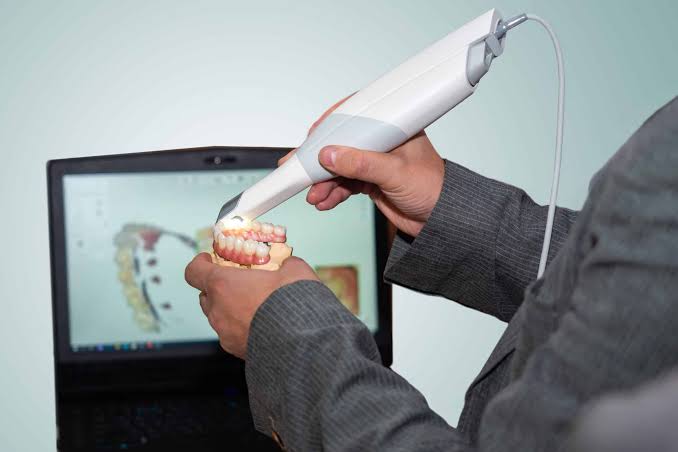
Same-day restorations add a step to your team’s day. Alongside the prep and the scan, someone now must confirm the margins, check the contacts, review the occlusion, and ready the restoration for the mill.
All of this new work runs through the dental CAD/CAM software. It takes the intraoral scan and turns it into a design you can mill or print, either proposing most of the anatomy for you or letting you fine-tune the fit, contours, and production settings by hand.
For a practice owner weighing whether to bring same-day restorations in-house, the design platform deserves as much attention as the hardware. A capable scanner paired with weak software still stalls at the design stage. Strong software with clear workflows keeps the appointment moving from prep to seat.
In this guide, we break down how CAD CAM dental software fits between the scan and the finished restoration, how a same-day crown moves through the software, and what to compare before choosing a platform for your practice.
H2: What CAD/CAM Software Does in a Same-Day Workflow
Dental CAD software sits between the intraoral scanner and the manufacturing device. It reads the scan, helps the clinician design the restoration, then prepares instructions the mill or printer can follow. One platform can bridge both halves of the process.
The CAD side covers design. The CAM side covers manufacturing. CAD tools let clinicians mark margins, set contacts, and sculpt the crown surface. CAM tools translate the finished design into the physical part.
A few terms become especially useful once you start comparing chairside CAD/CAM systems.
- STL and PLY files: the scan data formats that store the 3D surface. STL holds geometry; PLY can also carry color.
- Margin marking: defining the exact border where the restoration meets the prepared tooth.
- Proposal: the software’s first automated crown suggestion, based on the scan and the tooth library.
- Nesting: positioning the design inside a ceramic block or printed batch to use material well.
- Tool paths: the cutting routes the mill follows to carve the part.
Good CAD CAM dental software should remove repetitive work without taking the clinician out of the decision-making process. Automation can get you to a usable proposal faster. The operator still decides whether the restoration is clinically ready.
H2: From Scan to Seated Crown in One Visit
The single-visit process follows a predictable arc. Knowing each checkpoint helps a practice spot where appointments slow down.
Step 1: Scan the Prep, Opposing Arch, and Bite
Everything starts with clean data. Capture the prepared tooth, the opposing arch, and the bite, and make sure the margins are dry and clearly exposed before you scan. Clean, dry margins produce cleaner data.
Step 2: Generate the Design Proposal
Once the data enters the dental CAD software, the program generates the working model and initial restoration proposal. The clinician can then examine the margin, proximal contacts, occlusal relationship, anatomy, contours, and material thickness.
Step 3: Refine Margins and Contacts
Confirm the margin line first, then adjust the proximal and occlusal contacts against the neighboring teeth. Be sure to pay careful attention here, since contacts set too tight turn into long chairside adjustments later.
Step 4: Send the Design to Manufacturing
Once the design is locked in, nest it inside the block or printed batch, generate the tool paths, and send the job to the mill or printer. Good nesting uses material efficiently and sets up a clean cut or print.
H3: Where Delays Show Up
Most stalls in same-day restorations trace back to a few points.
- A margin the software cannot read clearly forces a manual redraw.
- Weak scan data around a subgingival prep means rescanning.
- Contacts set too tight create long chairside adjustments after the crown comes out of the mill.
Material choice takes time, too. For instance, a milled ceramic crown may need a firing or glaze cycle before seating. Building these steps into the appointment schedule keeps the visit realistic for both the team and the patient.
H2: Chairside Software vs. Lab-Based Design Platforms
Chairside CAD/CAM systems favor speed and a guided, integrated experience. Lab-oriented dental design software is meant for flexibility, open file formats, and a wider case range.
Chairside platforms suit single-visit crowns, inlays and onlays. The workflow is streamlined so a clinical team can design between other duties. Lab-based platforms, such as open programs used across many labs, cover bridges, implant bars and complex prosthetics, but carry a steeper learning curve.
| Factor | Chairside integrated software | Lab-based open software |
| Setup | Fast, guided out of the box | Longer, more configuration |
| Learning curve | Gentle, made for clinical teams | Steeper, favors trained designers |
| Case complexity | Single-unit and small cases | Full-arch, bridges, implant work |
| File openness | Often closed or semi-closed | Open STL and PLY across devices |
A solo practice doing a handful of single crowns each week is well served by an integrated chairside system. A group practice or in-house lab producing bridges and implant restorations gains more from open, lab-grade design software connected to several scanners and mills.
H2: How to Evaluate Dental CAD Software Before You Buy
Comparing platforms is easier with a short checklist. These points affect daily use far more than any feature sheet.
- Usability: how fast a real clinical team, not a specialist, moves from scan to send.
- Proposal quality: how close the first automated design lands to a seatable crown.
- Scanner and mill compatibility: whether the software reads a practice’s scanner data and drives the chosen manufacturing device.
- Open vs. closed ecosystem: open platforms accept STL and PLY from many sources; closed ones lock a practice into one brand’s chain.
H3: Count Training and Support as Real Costs
Software price is only part of ownership. Training, onboarding, and support determine how quickly the investment pays back. A team that never learns the design tools will mill slow, inconsistent crowns no matter how strong the platform is.
Hands-on instruction, video libraries and responsive support shorten this ramp. Treat them as part of the purchase.
H3: Verify Details Before Committing
Pricing, subscription terms and material compatibility change frequently. Confirm current numbers directly from vendors and recent search results rather than relying on older reviews. Check which ceramic blocks, resins and mills a platform validates: the list will decide what your practice can produce.
Frequently Asked Questions
What is the best dental CAD/CAM software for same-day restorations?
There is no single winner. The best dental CAD/CAM software for same-day crowns depends on the practice’s case mix, scanner, and mill. Solo practices doing single units value guided chairside speed, while groups doing complex work value open, flexible design tools.
Is there any free dental CAD/CAM software?
Some open-source and free viewers exist, and a few labs use them for basic tasks. Clinical same-day restoration workflows generally rely on paid, validated platforms because of support, material libraries, and device compatibility.
How long does it take to learn CAD/CAM design?
Basic single crowns can be learned in days with good training. Confident, fast work across varied cases usually takes weeks of regular use. Structured courses and hands-on practice shorten that timeline considerably.
Does CAD/CAM software work with any intraoral scanner or mill?
Not always. Open platforms read standard STL and PLY files and drive many devices. Closed systems work only within one brand’s hardware chain, so confirm compatibility with the specific scanner and mill first.
Talk to CAD-Ray About Building Your Same-Day Workflow
Bringing restorations in-house is easy to picture as an equipment purchase. The better way to look at it is as one connected clinical workflow.
Start with your case mix. If most of your chairside work is single crowns, lean toward guided software built for speed. If bridges and implant cases are part of the picture, you’ll want an open, lab-grade platform with room to maneuver. The right fit depends entirely on the dentistry you already do.
Then invest in your team. The hardware is the easy part; confident, well-trained clinicians are what turn a purchase into a predictable result. Clean preps feed clean scans, clean scans feed clean designs, and a workflow rehearsed until it feels routine is what keeps every appointment on schedule.
Talk with the doctor-owned, peer-to-peer team at CAD-Ray to compare dental CAD/CAM software options and create a same-day restoration workflow around your scanner, case mix, production equipment, and clinical goals.
CAD-Ray works with open and integrated digital dentistry systems and provides software, equipment, training, and workflow support for practices bringing more production in-house.
Schedule a consultation with CAD-Ray today.

