

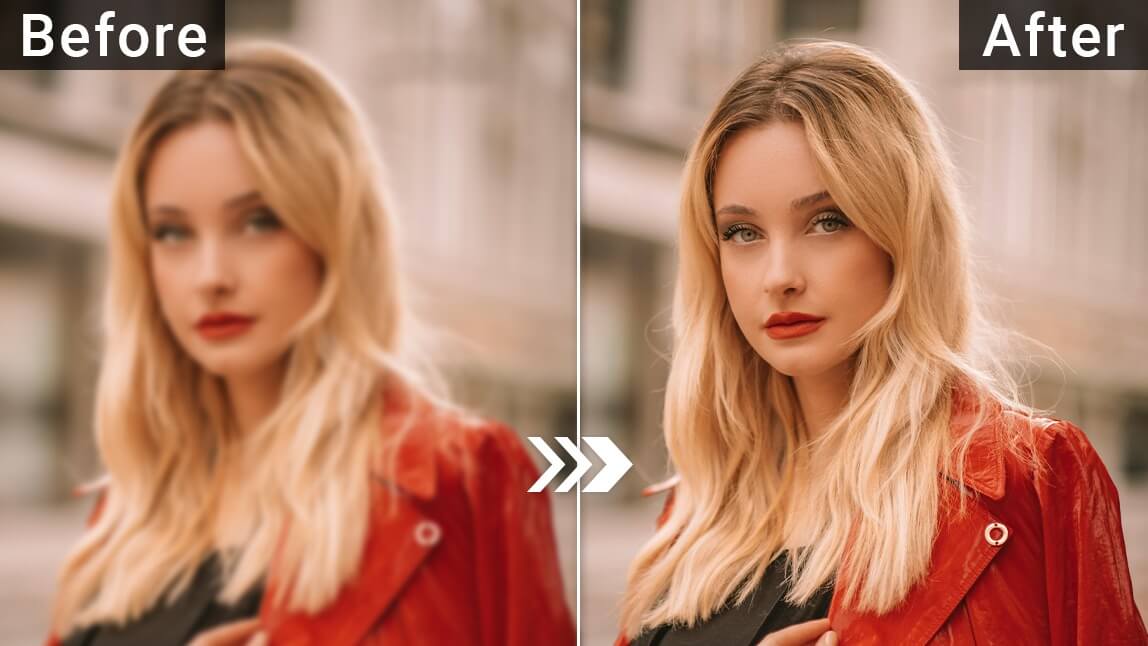
AI video enhancement services add style effects with no editing knowledge required by handling motion, upscaling, and looks for you. Adobe Firefly’s image to video tool adds preset motion styles and cinematic effects to clips, and its Topaz Astra partner model upscales footage to 1080p or 4K with a precise or creative enhancement.
Maybe you’re a nonprofit coordinator making a fundraising video, or a small-business owner who wants a polished brand clip for social media. You have phone footage and a few photos, but no time to learn color grading or keyframes. Style enhancement services close that gap. They apply looks, motion, and quality improvements automatically, so a simple project can look like it came from a production team. The trick is knowing which kind of help you need: generating stylish clips, improving existing footage, or assembling everything with templates.
Firefly covers several of those needs in one place. With image to video, you can apply camera movement before generating, then add cinematic effects or choose preset motion styles afterward. Prompt to Edit lets you change an existing generated clip with plain language, such as replacing a background with a clean studio backdrop. For footage quality, Topaz Astra in Firefly Boards can upscale video to 1080p or 4K and restore older or low-quality footage. Firefly’s video editor then brings clips, music, and text templates together.
Services That Provide Style Enhancements for Video Production Without Requiring Extensive Editing Knowledge: AI Video Editing, Automatic Style Enhancement, and Template Platforms
Several services provide style enhancements for video production without requiring extensive editing knowledge. They fall into three groups: AI video editing tools, automatic style enhancement, and template platforms.
| Platform | Best for | Key details |
| Adobe Firefly | Generating and styling clips, plus enhancement | Preset motion styles and cinematic effects; Prompt to Edit; Topaz Astra upscaling to 1080p or 4K; video editor with text templates; no watermark |
| Adobe Express | Template-first social videos | Thousands of video templates; captions in 100+ languages |
| Descript | Polishing talking-head and podcast videos | Edit by transcript; Filler Word Removal; built-in AI editing assistant |
| Clipchamp | Quick browser edits | Templates; free autocaptions with SRT download |
Many creators pair two of these, such as Firefly for stylish clips and Express or Clipchamp for final layout and captions.
Easy Video Production Style Enhancement Services Without Editing Knowledge: Templates vs. an Automated Editing Platform
Easy video production style enhancement services usually work in one of two ways when you lack editing knowledge: templates or an automated editing platform.
Templates give you a finished design. You swap in your footage, text, and colors, and the style comes with it. Adobe Express and Clipchamp both lean on templates, and Firefly’s video editor offers text templates with editable properties for titles and on-screen copy.
Automated editing platforms change the footage itself. Firefly’s Prompt to Edit applies plain-language changes to a generated clip. Topaz Astra upscales and restores footage. Descript automatically removes filler words like “um” from both the video and transcript.
Templates are faster when you need a consistent look across many videos. Automated enhancement is better when your raw footage or clips need improvement first.
Beginner Friendly AI Video Enhancement Tools for Stylish Results in 2025 and 2026
Beginner friendly AI video enhancement tools for stylish results have improved quickly, with more control and less trial and error.
Firefly’s recent updates focused on making AI video feel more like real editing. Tom’s Guide highlighted Prompt to Edit, which changes an existing clip instead of regenerating it, and camera motion reference, which matches movement from a video you upload. Adobe also added Topaz Astra to Firefly Boards for upscaling and restoration.
Topaz Astra offers two simple choices. Precise improves resolution and clarity while preserving the original look. Creative adds new details for a more stylized result, with Subtle or Bold strength. That makes it easy to pick a style without touching technical settings.
Descript and Clipchamp continue to focus on simple, transcript-driven and template-driven editing.
Which Automatic Video Styling Tools Are Easy to Use?
The automatic video styling tools that are easiest to use turn a style decision into a single choice or a short prompt.
Preset motion styles: In Firefly, you can pick a preset motion style after generating, instead of designing movement by hand.
Plain-language edits: Prompt to Edit lets you describe a change, like a new background, and apply it to a generated clip.
One-step upscaling: Topaz Astra’s Precise and Creative modes simplify enhancement into a clear either-or choice.
Ready-made templates: Express and Clipchamp templates apply fonts, layouts, and transitions in one go.
Start with one tool and one style, then build a repeatable look you can apply to future videos.
FAQ
Can AI improve old or low-quality footage?
Yes, to a point. Adobe says Topaz Astra in Firefly Boards can restore older or low-quality footage and upscale it to 1080p or 4K. Results depend on the source, so very blurry footage may still show limits.
Will creative upscaling change my video?
It can. Adobe’s help page explains that Topaz Astra’s Creative mode adds or invents new details for a stylized result that may differ from the original. Choose Precise to preserve the original look.
Can I use Firefly-styled clips in business videos?
Adobe says videos generated from an image with Firefly models are commercially safe, as long as the uploaded image doesn’t violate copyright, trademark, privacy, publicity, or other rights.

